
The X next to a name on Snapchat means you are not friends with that person. Removed or Unfriended: they took you off their friends list, or you took them off yours. Pending or Unaccepted Request: a friend request is still waiting, sent by you or sent by them. Limited Communication: your Snaps and chats stay Pending until you are friends again. Press and hold the name and you can clear the chat, add the person back, or block them. And a blocked account does NOT show an X, a block removes the chat and the profile in full.

What Does the X Mean on Snapchat?
The X on Snapchat means the person is not on your friends list. You two are not mutual friends right now. That is the full meaning of this small X icon. It is a friend status sign, not a warning, not an error, and not a punishment.
You may have typed this question in a few ways. Some people search “what does the X on Snapchat mean”, some type “on Snapchat what does the X mean”, and some ask what does the X next to someone on Snapchat mean. All of them are asking about the same grey sign next to a name.
The X sits in your chat list, right next to the person’s name, in the place where the camera icon normally sits. Our Snapchat Planets guide explains signs like this every week, and this X mark is the one that worries people the most. The X only shows the state of the friendship right now, nothing more.
Why the X Appears Instead of the Camera Icon
For a friend, Snapchat shows a camera next to the name, so you can send a Snap in one tap. For someone who is not your friend, there is no need for a fast camera button, so the app shows the X in its place.
The official Chat icons guide on Snapchat Support shows a grey pending icon for a person who has not added you back. Support does not give the X its own name on that page, but the rule behind it is the same one: no mutual friendship, no camera. The X is how the chat screen shows that rule.
Why Does the X Appear on Snapchat?
There are four real reasons for the X, and one of them will match your case.
1. A friend request is pending. They sent you a request and you have not accepted it yet, or you sent one and they have not accepted yours. Until one side accepts, the X stays next to the name.
2. You were removed or unadded. A person who was your friend took you off their list, or you removed them some time ago and forgot. The old camera icon turns into an X the next time the chat list loads.
3. A person who is not your friend sent you a message. This can be a reply to your public Story, or a first message from search or from a group. The chat opens with an X because the sender is not on your friends list yet.
4. The app has not updated the status yet. Some users report seeing the X for a short time right after a friend change, while the app still shows the old status. This one is reported by users, not stated by Snapchat, and it normally clears on its own. The “X but still friends” section below covers it in full.
What Does the Little X Mean on Snapchat? Small X, Grey X and Gray X
What does the grey X next to someone’s name mean on Snapchat? It means the same thing as every X in your chat list: you are not friends with that person. People in the US type gray X and people in the UK type grey X, but both groups are asking about one and the same sign.
The little X and the small X are also the same icon. It only looks small because it sits in a thin row next to a name and a round profile photo. A small size does not give it a second meaning. If the X is next to a name, big or small, grey or gray, it always means one thing: not friends.
The colour holds one more clue. Snapchat uses grey for things that are waiting. A grey arrow means a sent Snap is waiting. This grey X means a friendship is waiting, for a request to be accepted or for one side to add the other back. There is no red X and no blue X in the chat list.
Where You See the X on Snapchat
In Your Chat List
The X does not live in one place only, and where you see it changes what it wants from you. Its most common home is the chat list. The X beside a name, the same X by someone’s name that most people ask about, takes the place of the camera and chat icons. It marks a chat with a person who is not your friend.
In Added Me and Quick Add
Here the X does a different job. In Added Me, it sits with people whose requests are waiting for your answer. In Quick Add, the X is a button: tap it and that suggested friend is removed from your list of suggestions. It says nothing about friendship there. It is only a “no thanks” button.
In Search Results and Group Chats
If you search a username of a person you never added, you can meet the X in the results too. In a group chat, an X can sit next to a member whose invite is still pending and who has not fully joined the group yet.
On Snapchat Web
The same rule works on Snapchat Web at web.snapchat.com. If you are not friends with a person, the web version shows the X next to their name, just like the app. Friends get the camera, non-friends get the X, on every screen.
The same chat screen holds other small signs too, like the moon. If those puzzle you as well, our guide on What Are Snapchat Moons? explains each one in plain words.
What Happens When You Tap the X?
Knowing the answer to “what does the X mean on Snapchat” is one half of the problem. Knowing what to tap is the other half. Tap the person’s name and Snapchat shows you the state of things. If a request is waiting, you get the choice to accept it or to report or block the person. Press and hold the name, or tap the X, and you get more choices, like clear conversation. Which tap is right depends on your case, so use this small table.
| Your case | Best action |
|---|---|
| You know the person and the request is real | Accept the request, the X turns into a camera |
| You do not know the person | Ignore the request, or clear the chat |
| The person keeps sending requests | Block them |
| The account looks fake or sends spam | Report it, then block it |
| You only want the old chat out of your list | Clear the conversation, this hides the chat and does not block anyone |
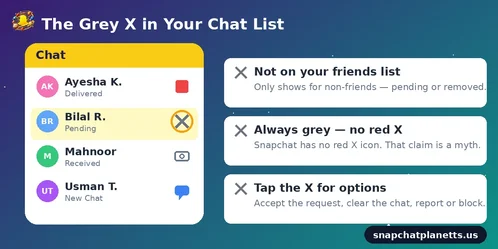
Two things are worth knowing. Clearing a chat does not block the person, and blocking is stronger than the X in every way. A block is covered in the next sections.
Am I Blocked or Unadded on Snapchat?
This is the question almost everyone asks next, so here is the clear split. The X alone never proves a block. In fact, seeing an X is a sign that you are most likely NOT blocked, because a block hides far more than an X does.
First check the profile. Open the person’s profile and look for their Snapscore. If the score is hidden and the profile shows an Add Friend button, you are not friends with them. They removed you, or you never added each other. Treat the Snapscore as a strong clue, not as proof on its own, and match it with the 60-second check below.
Now test for a block. Type the username in the search bar. If the name does not come up at all, and the chat and the profile are both gone, that is the blocked picture. If you can still find the profile and see the Add Friend button, you were unadded, not blocked. Stories give one more clue: if their private Stories stop for you but their public posts still show, that fits unadded, while a block cuts off both. And when you only want to view a public Story without your name in their viewer list, an anonymous Snapchat story viewer is the tool made for that job.
X vs Blocked vs Removed vs Pending vs Grey Arrow
Half of the question “what does the X mean on Snapchat” is telling the X apart from the signs near it. These five signs get mixed up a lot, so the two tables below keep them apart.
| You see | What it means | Chat and profile |
|---|---|---|
| The X | You are not friends | Chat stays in your list, profile is still findable |
| Blocked | The person blocked you | Chat is gone, profile cannot be found in search |
| Removed | One side removed the other | Chat can stay, profile shows an Add Friend button |
The second table is about messages, not friendship.
| Sign | What it tells you |
|---|---|
| The X | A friendship state: you two are not friends |
| Pending | A message state: your Snap or chat is waiting and has not reached a friend |
| Grey arrow | The same waiting state, shown as an arrow next to a sent Snap |
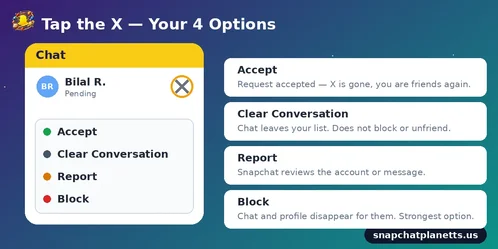
So the X speaks about the person, and Pending speaks about the message. Once you keep those two apart, every icon on the chat screen is easy to read.
How to Tell Which Cause Is Yours — The 60-Second Check
You do not have to guess. Four quick checks, in this order, point to your cause in under a minute.
Check 1: Open Added Me. If the person is sitting there with a request, your cause is a pending request. Accept it or ignore it, and you are done.
Check 2: Open their profile. If you see an Add Friend button and no Snapscore, you are not friends. One of you removed the other, or you never added each other in the first place.
Check 3: Look at your last message to them. If it says Pending and never changed to Delivered, the friendship is not active. This fits both a pending request and a removal.
Check 4: Search their username. If the name cannot be found at all, read the blocked signs in the “Am I Blocked or Unadded” section again. That is the one case where the X is not the full story, because a true block normally leaves no X and no chat at all.
Match your result with the four causes above, and you know where you stand.
X on Snapchat but Still Friends — Causes and Fixes
Sometimes the X is simply wrong. Your friend says you are still on their list, you can still see their Stories, yet the X sits next to their name. In this “X but still friends” case, the friend change may not have synced yet. The app can also hold an old picture of your list in its cache. A fresh app update, a new phone, or a friend who deactivated their account and came back can leave the same stale X behind.
Fix it in this order, and stop at the step that works:
- Open the chat once, go back, and pull the chat list down to refresh it.
- Close the app in full and open it again.
- Clear the cache: open your profile, tap Settings, go to Account Actions, and tap Clear Cache.
- Update Snapchat to the newest version in your app store.
- Log out and log back in. Your account reloads your full friends list this way.
Clearing the cache does not delete your saved Memories. Those live on your account, not in the cache, as we explain in our guide on whether Snapchat is deleting Memories.
How to Remove the X on Snapchat
The right fix depends on the cause, so use the cause you found with the 60-second check. If a request is pending: accept it. The moment you are friends, the X turns into the camera icon. If the request is yours and still waiting, you can only wait, or clear the chat and add them again later. If you were removed: open the profile and tap Add Friend. If they accept, the X is gone. If they do not, the X stays, and that is their choice to make.
If a non-friend messaged you: add them if you want to talk, or clear the conversation if you do not. Both remove the X from your list. If the X is wrong: run the five fixes in the section above, in order.
One last point, because many people ask: how long does the X stay if you do nothing? Snapchat gives friend requests no public time limit, so a request, and its X, can sit in your list for weeks or months. The X leaves only when the friendship state changes: an accept, an add back, a block, or a cleared chat.
Does the X Affect Your Snap Score, Streaks and Best Friends?
Your Snap Score does not drop because an X appeared. The score you already earned stays yours. You just cannot grow it with that person while you are not friends, because your Snaps to them stay Pending.
A Snapstreak is less lucky. A streak needs a Snap both ways, every day. Snaps that sit Pending do not count, so a streak with that person ends while the X is there. Add each other back fast if the streak matters to you, because a lost streak does not come back on its own.
Best Friends change slowly. A person you cannot Snap will slide down and off your Best Friends list over time, and the friendship planets in Snapchat Plus need an active friendship too, so that person drops out of your solar system. Our guide to Snapchat best friends planets shows how those ranks are built, and our guide on what does the red heart mean on Snapchat covers the sign for your number one best friend.
Why Would Someone Unfriend or Remove You?
This is the second question everyone asks, right after “what does the X mean on Snapchat”. Most of the time, it is not personal, and Snapchat will never tell you the reason. There is no alert and no note. The common reasons are plain ones.
People clean long friend lists and remove names they no longer talk to. Some make a new account and leave the old friendships behind. Some tighten their privacy settings and keep only close friends. A removal can also be a plain mistake, one wrong tap in the friend list, or an account that was deactivated for a while and came back changed.
The X gives you the fact, never the story behind it. If the person matters to you, the healthy move is simple: add them back, or ask them on another app. Do not read more into a grey icon than it holds.
Snapchat X Myths That Are Not True
Wrong claims about this icon spread fast, and some pages answer “what does the X mean on Snapchat” with claims that are simply not true. Here are the ones to drop. Myth: There is a red X on Snapchat. There is no red X in the chat list. The red signs on Snapchat are Snap icons, not this X. And an X never means a failed Snap either. A failed Snap shows its own error, not an X next to a name. Myth: The X means you are blocked. A block removes the chat and hides the profile. If you can see an X and a chat, a block is the one thing it almost never is.
Myth: A blocked person still gets your messages. No. A block cuts contact in full. Your Snaps and chats do not reach a person who blocked you, in secret or in any other way. Myth: Clearing a conversation blocks the person. Clearing only hides the chat from your list. The person can still message you, and the chat can come back.
Myth: The Snapscore proves your friend status. The score is a clue, and a good one, but clues are not proof. Always match it with the profile and search checks above. Myth: The white X is also a friend status sign. The white X you see on dark screens is a close button for a Snap or a Story you are viewing. The friendship X is grey, and it lives in the chat list only.
Frequently Asked Questions
More questions people ask once they know the answer to “what does the X mean on Snapchat”:
If I add the person back, do our old chats and saved messages come back?
Yes, once you are friends again the old chat returns with its saved messages, unless either of you cleared the conversation.
Does Snapchat notify the other person when the X appears or when I remove them?
No, Snapchat sends no notification when the X appears or when you remove someone.
Can someone with an X next to their name still see my Stories?
Only if your Stories are set to Everyone, a non-friend cannot see Friends-only Stories.
If I ignore their friend request, will they know and can they add me again?
No, ignoring sends them no alert and the request quietly disappears from your list, and they can still try adding you again later.
Can I still send a Snap or message to someone with an X — what happens to it?
Yes, you can send it, but it stays Pending and reaches them only if they add you back.
Conclusion
So, what does the X mean on Snapchat? The X is a small sign with one job: it shows that a friendship is not active. It is not a block, not an error, and not a red flag about you. Find your cause with the 60-second check, fix it by that cause, and the camera icon comes back.
Snapchat Planets checked this guide against the official Snapchat Support chat icons page in November 2026, so the icon rules above match the app as it works today.
One Response