Snapchat moons confuse a lot of people, and there is a simple reason for that. Snapchat has no official feature with the name “moons.” The word “moons” mixes a few different things that all use a moon shape. So the first step is always the same: ask where you saw the moon.
A snapchat moon can show up in five places. It can sit next to a chat name. It can sit on the camera screen. It can sit on the Chat page as a picture. It can show up as a face filter. Or it can sit next to Earth in the Planets view. Each place has its own meaning, and none of them mean the same thing.
That is why moon snapchat searches give so many mixed answers. The same thing happens with moons snapchat searches: one person sees a moon in a chat, another sees one on the camera, and both want one clear answer. One guide talks about mute settings. Another talks about the camera. A third talks about best friends. All three are right, but each one is talking about a different moon. This guide puts all of them in one place so you do not have to read five guides.
Here is the short map. Use it to jump to the part you need.
| Where you saw the moon | What it means | Read this part |
|---|---|---|
| Next to a chat name | Do Not Disturb is on for that chat | Moon Icon = Do Not Disturb |
| On the camera screen | Low-Light mode | Moon Icon on the Camera |
| On the Chat page | A chat background picture | Full Moon on the Chat Page |
| As a face filter | A moon lens | Part 2: Moon Lenses |
| Next to Earth in Planets | You are the 3rd best friend | BSF List |
To learn the full Planets order first, visit Snapchat Planets. The rest of this guide will use plain words only, so an 8th-grade student can follow every step.
One more thing to know before we start. Moons on Snapchat are not a rank. A moon does not tell you that you are a good friend or a bad friend. It tells you about a setting, a camera mode, a picture, or a list position. Keep that in mind and the rest will make sense.
What Does the Moon Icon Mean on Snapchat?
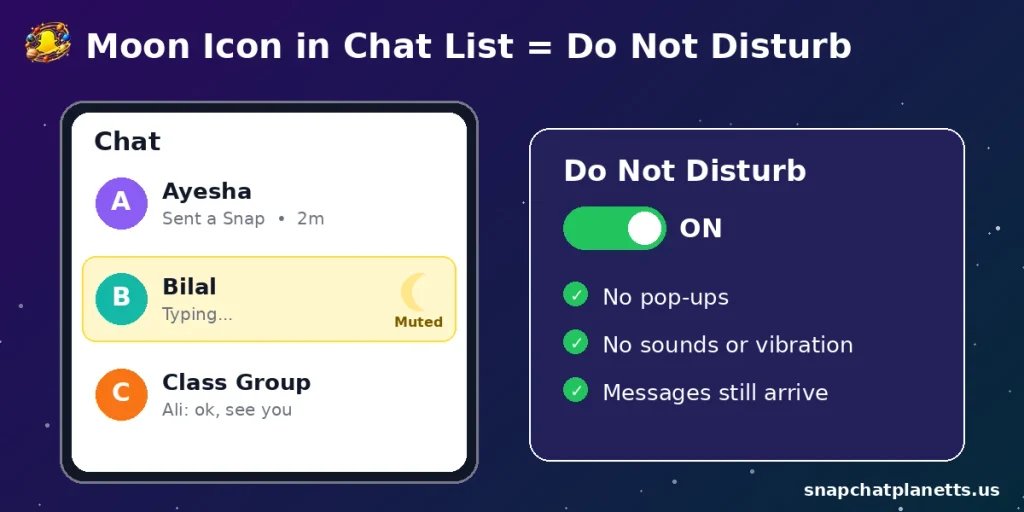
The most common meaning of the moon icon snapchat users see is simple: the chat is muted. When you see a small crescent moon next to a friend’s name in your chat list, it means Do Not Disturb is on for that one chat. You turned the sound off for that chat only. Nothing else changed.
The snapchat moon icon does not mean you blocked the person. It does not mean the person blocked you. It does not mean the friendship ended. It only means you will not get alerts from that chat for now. This is the part most guides get wrong, so let us make it clear.
What Happens When Do Not Disturb Is On?
When Do Not Disturb is on for a chat, three things change. First, you get no pop-ups from that chat. Second, you hear no sounds from it. Third, you feel no vibration alerts from it. Your phone stays quiet when that friend sends a message.
But the messages still come in. Snaps and chats still arrive in the normal way, and you can open them and reply at any time. The moon only stops the alerts. It does not stop the messages. That is the whole job of Do Not Disturb.
This is useful when you want quiet time. You may be in class, at work, or trying to sleep. You can mute one chat and keep the rest as they are. The moon snapchat meaning here is just “quiet for this chat.”
Who Can See the Moon?
Only you can see the moon. The other person is not told that you muted the chat. Snapchat does not send them a note, and the moon does not show up on their phone. It is only visible to you, on your own chat list.
This is why you should not worry when you see a moon next to your own chats. It means you muted that chat at some point, maybe by mistake. It does not mean your friend did something to you. If you did not mean to mute the chat, you can turn it off in a few taps. Part 2 of this guide shows both ways to do it.
One-to-One Chats and Group Chats
Do Not Disturb works on one-to-one chats and on group chats. The moon shows up per chat, not for your whole app. You can mute one friend and one group, and all your other chats will still send alerts as normal.
A crescent moon snapchat users see is almost always this DND moon. The crescent shape is the sign Snapchat uses for a muted chat. If the moon is next to a name in your chat list, start with this meaning first. It fits most of the time.
Snapchat Moon Order: Full, Half, Crescent, Blue, New Moon and Dark Moon
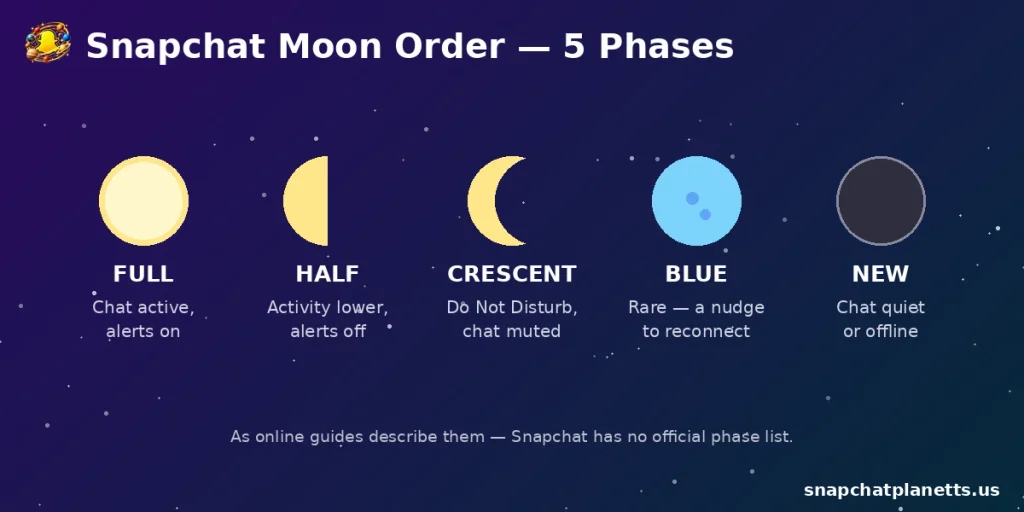
The snapchat moon order is the part that causes the most confusion online. Many guides show a table of five moon phases. Each phase is said to mean something about a chat. Here is that table, in the order most guides use it.
| Moon phase | What guides say it means |
|---|---|
| Full Moon | The chat is active, and alerts are on |
| Half Moon | Chat activity is lower, and alerts are off |
| Crescent Moon | Do Not Disturb is on, and the chat is muted |
| Blue Moon | Rare, and tied to a special setting or mute |
| New Moon | The chat is quiet or the friend is offline |
| Dark Moon | A close friend who ranks high in the Friends List |
Now comes the honest part, and it matters. Snapchat has no official list of moon phases. There is no page on Snapchat’s help site that lists these five phases as a real feature. The phases come from fan guides and social media posts, not from Snapchat itself. Google’s own answer says the same thing: the phases are not real, and they do not measure a friendship.
So use the table as a map of what people say online, not as a fact from Snapchat. The snapchat moons in order you see in guides are a fan idea. The only real order Snapchat gives you is the Planets order, which we cover in the BSF List part below.
There is one more mix-up to avoid. Some guides show a “moon order by streak days.” They say a New Moon means no streak, a Crescent means 1 to 3 days, and a Full Moon means 16 or more days. That version is also a fan idea, and it does not match the table above. Do not mix the two tables. Neither one comes from Snapchat.
The safe way to read any moon you see is this: check where you saw it first. If it is next to a chat name, it is almost always Do Not Disturb. If it is on the camera, it is Low-Light mode. If it is next to Earth, it is the Planets list. The phase table can help you guess, but it cannot tell you the truth on its own.
Snapchat Moon BSF List: What the Moon Means in Your Best Friends List
The snapchat moon bsf list is a search a lot of people make, and it has a simple answer. A moon in the Best Friends list means you are that person’s best friend, but you are outside their top 8 friends. There is no moon rank number. The moon is not a rank like 9th or 10th. It just shows that you are close, but not in the top 8.
Snapchat shows your top 8 friends as planets in the Friend Solar System. This feature needs Snapchat+, and it is off by default. You have to turn it on yourself. Here is the order, from closest to farthest.
| Position | Planet | What it means |
|---|---|---|
| 1st | Mercury | Your closest friend |
| 2nd | Venus | Your second closest friend |
| 3rd | Earth | Your third closest friend |
| 4th | Mars | Your fourth closest friend |
| 5th | Jupiter | Your fifth closest friend |
| 6th | Saturn | Your sixth closest friend |
| 7th | Uranus | Your seventh closest friend |
| 8th | Neptune | Your eighth closest friend |
Earth is the only planet in this list that has a moon in its picture. That is why people ask about the moon and Earth together. If you see a moon next to Earth, you are looking at the Earth #3 spot. It means you are that friend’s third best friend.
Your planet spot can change. Snapchat looks at how often you snap and chat, and it moves the order up or down. The main things it looks at are Snap Frequency, Chat Consistency, Quick Replies, Recent Activity, Snap Streaks, and Story Engagement. If you talk to a friend more, your spot can move up. If you talk less, it can move down.
A best friend moon snapchat search is really a Planets question, not a moon question. The moon is just part of Earth’s picture. The real answer is your spot in the top 8. If you are not in the top 8, you will not see a planet for yourself on that friend’s list.
If you want to learn what the heart signs mean too, read What Does the Red Heart Mean on Snapchat?. Hearts and planets both tell you about friendship, but they measure different things. A heart shows a best friend bond. A planet shows your rank in the top 8.
The moon best friend list snapchat question has one more answer worth knowing. Your own Best Friends list is private. Only you can see your own list. Your friends cannot see where they rank on your list, and you cannot see their full list either. You can only see your own planet spot on a friend’s profile, one friend at a time.
Full Moon on the Chat Page: It Is a Chat Background
A full moon on the Chat page is a different thing from the DND moon. When you see a full moon on the Chat or Messages page, it is a chat background. Someone picked a moon picture as the look for that chat. It is a theme, like a wallpaper on your phone.
This moon does not mean the friendship is active. It does not mean the friend is online. It does not mean you have a high rank. It is just a picture. Guides that say a Full Moon means “active chat” are mixing two ideas: the phase table from the last part, and this background picture. They are not the same.
One note of care here. Some guides say this background is still being added, so you may not see it on your phone yet. If you do not see it, that is normal. It does not mean your app is broken. It just means the feature has not reached you yet.
If you do see it and you do not like it, you can change the chat background back to a plain look. The steps for that are in your chat settings, next to the other chat options. The moon on snapchat you see on the Chat page is the easiest moon to understand: it is a picture, not a signal.
Moon Icon on the Camera: Low-Light Mode
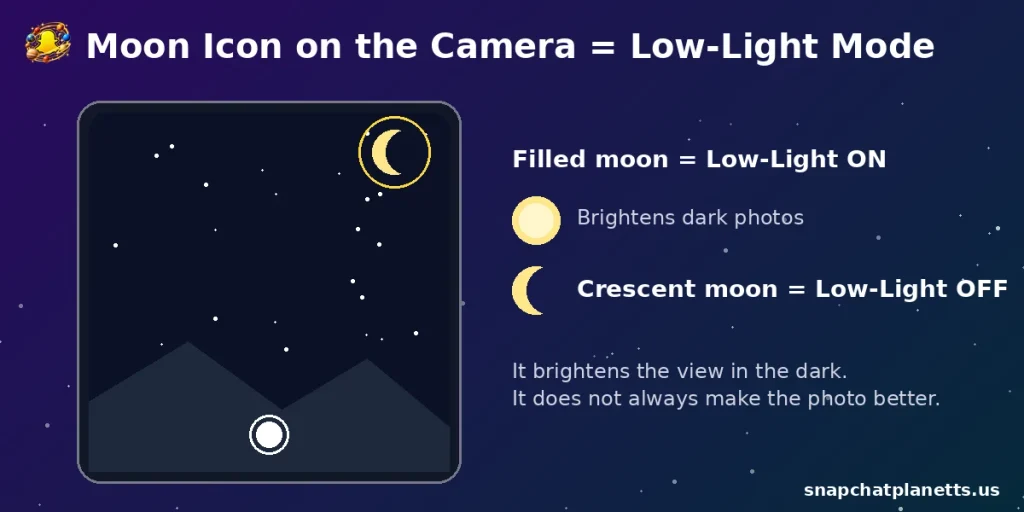
The moon on the camera screen is the second most common moon, and it has nothing to do with chats. When you open the Snapchat camera and you see a small moon icon in the top-right corner, that is Low-Light mode. It is also called Night Mode by some guides.
Low-Light mode helps you take photos and videos when it is dark. When you tap the moon, the camera brightens the view so you can see more. The moon sits next to the flash because it is a camera tool, not a chat tool. That is why it is on the camera screen and not in your chat list.
Tapping the moon switches it on and off. A filled moon means Low-Light is on. A crescent moon means it is off. You can tap it by hand any time you want, or you can let the app turn it on by itself when it gets dark.
One honest note: Low-Light brightens what you see, but it does not always make the photo better. An old guide from 2017 even said the extra light is small and the photos can look worse. So use it when you need it, but do not expect it to fix a very dark room. The moon snapchat filter searches people make are often about this camera moon, not about a filter. If you want real moon face filters, Part 2 covers the two official moon lenses.
Snapchat Moon Lenses: “Your Moon” and “Sun and Moon”
A moon on Snapchat can also be a face filter. These are called AR Lenses, and two of them are official Snapchat lenses with moon in the name. They have nothing to do with mute settings or best friend lists. They are just fun camera effects.
The first one is called Your Moon. It turns your face into an animated, glowing moon. You open the lens, point the camera at your face, and your face blends into a full moon shape. It is a filter for photos and videos, not a status sign.
The second one is called Sun and Moon. It puts a small sun tattoo on one cheek and a crescent moon with stars on the other cheek. The look is simple and clean, and it is made by Snapchat itself. You can find both lenses by searching their names in the lens search bar.
This is the part people mix up most. A lens moon does not mean a chat is muted. It does not mean you are a night owl. It does not mean you rank high with a friend. It only means you picked a moon filter for that photo or video. The moon on snapchat meaning changes with the place, and a lens is a different place from a chat list.
If a friend sends you a snap with a moon face, they are playing with a filter. Nothing more. Do not read a hidden message into it.
Moon Emoji Next to a Friend’s Name: The Night Owl
There is one more moon, and it lives next to a friend’s name. This one is a moon emoji, and it means you and that friend snap each other mostly late at night. Snapchat calls this kind of friend a night owl. You both stay up late, and you both send snaps when most people are asleep.
This moon is not a setting you can turn on. Snapchat’s system looks at what time you and your friend send snaps to each other. If most of your snaps go back and forth late at night or very early in the morning, the moon shows up next to that friend’s name. If you both start snapping more in the day, the moon will fade away on its own.
Only you can see this moon. Your friend does not get a note about it, and their phone does not show it. It is a private sign on your own screen. It also only shows up for one-to-one chats. You will not see it in a group chat.
Do not mix this moon with the DND moon. The DND moon sits next to a chat name and means you muted that chat. The night owl moon sits next to a friend’s name and means you both snap late at night. They look alike, but they mean different things. The moon meaning snapchat gives you depends on which of the two you are seeing.
One more thing: you cannot hide this moon with a setting. There is no switch for it. If you want it gone, you would have to change when you snap that friend, and that is not worth doing just for an icon. Just let it be.
Snapchat Moons vs Planets: What Is Different?
People ask if moons and planets are the same thing. They are not. They are two different features, and this table shows the difference in one look.
| Moons | Planets | |
|---|---|---|
| Official Snapchat feature? | No, a fan idea | Yes, built by Snapchat |
| Cost | Free | Needs Snapchat+ |
| What it shows | Mute and chat states | Your rank in the top 8 |
| Order | Five moon phases | Mercury 1st to Neptune 8th |
| Where you see it | Chat list, camera, lenses | A friend’s profile |
Snapchat+ is the paid plan that turns the Planets feature on. Moons cost nothing because there is no Moons feature to pay for. The moon shapes come from settings, camera modes, filters, and fan guides. The planets come from Snapchat itself.
The snapchat moon order people search for is really two orders mixed into one search. The first is the five moon phases: Full, Half, Crescent, Blue, and New. The second is the eight planets: Mercury, Venus, Earth, Mars, Jupiter, Saturn, Uranus, and Neptune. Only the planets order is official. The phases order is a fan idea. Keep them apart and you will not get confused.
Can you see Planets without Snapchat+? No. You need the paid plan, and you still have to turn the feature on yourself, because it is off by default. Moons need no plan at all. Anyone can mute a chat, use Low-Light mode, or try a moon lens for free.
If you want the full Planets guide, read Snapchat Best Friends Planets. It covers all eight planets, what each one means, and how your rank can move up or down.
How to Turn the Moon Icon On and Off
There are two ways to turn the DND moon on or off. Both work. Pick the one that is easier for you.
Path A: press and hold.
- Open the Snapchat app.
- Go to the Chat screen.
- Press and hold the name of the friend or group.
- Tap Chat Settings (the gear icon).
- Turn on Do Not Disturb. The moon icon snapchat users see will show up next to that chat.
Path B: use Settings.
- Tap your profile picture at the top of the screen.
- Tap the gear icon to open Settings.
- Go to Notification Settings.
- Find the chat in the list and turn on Do Not Disturb next to it.
To turn the moon off, do the same steps again and turn Do Not Disturb off. The moon will go away at once. Your messages will still be there, and nothing is lost.
To turn Low-Light on or off, tap the moon on the camera screen. A filled moon means Low-Light is on. A crescent moon means it is off. The snapchat moon icon on the camera is a switch, so one tap changes it.
Troubleshooting: Moon Won’t Appear or Won’t Go Away
Sometimes the moon does not do what you expect. Here are the fixes for the two most common problems.
Moon won’t appear. First, check that Do Not Disturb is on for that chat. If it is off, no moon will show. Second, check that you are looking at the right place. A lens moon only shows in the camera, and a Planets moon only shows on a friend’s profile. Third, update the app. An old app can miss new looks and settings.
Moon won’t go away. First, check Do Not Disturb again. If it is still on, the moon stays. Turn it off with the steps above. Second, check group chats one by one. Each group has its own DND switch, so muting one group does not mute the rest. Third, close the app and open it again. If the moon is still there after that, update the app.
On Android and iPhone, the feature is the same, but the settings screens can look a little different. The names are the same, and the steps work on both. If a button is in a different spot, look for the gear icon. That is always the way into Settings.
If your saved snaps are missing too, the moon is not the cause. Read our guide on is snapchat deleting memories to check if your Memories were archived instead of deleted.
If you want to check what a friend posted without opening the chat, you can use an anonymous Snapchat story viewer. Opening a chat does not remove the moon, but some people like to look first and reply later.
FAQs
Q: Can I hide or turn off the night-owl moon emoji?
A: No, there is no switch for it. The DND moon can be removed with the steps in this guide, but the night-owl emoji is made by Snapchat’s system from your late-night snaps.
It fades away on its own when you and that friend start snapping more in the day, so you do not need to do anything about it.
Q: What does a moon mean in a Snapchat streak?
A: A moon in a streak means you and that friend sent snaps to each other during the night hours. It is a sign of late-night snaps, not a sign of a muted chat.
It is different from the DND moon and from the night-owl friend emoji, even though all three use a moon shape.
Q: Can I see the moon icon on Snapchat Web?
A: No, you cannot. The moon and Planets features only work on the Snapchat phone app, and Snapchat for Web does not show them.
If you open Snapchat on a computer, you will not see the moon icons, the Planets, or the DND moon at all.
Q: Does the moon or Do Not Disturb affect my Snap Score?
A: No, it does not. Do Not Disturb only stops alerts for one chat, and your Snap Score is built from the snaps you send and receive.
Muting a chat will not raise or lower your score, and the moon itself does not change any number on your profile.
Q: Does the moon hide me or make me appear offline to friends?
A: No, it does not. The moon only mutes alerts for one chat, and it does not hide what you do on Snapchat.
Your friends can still see your snaps and stories as normal, and the moon does not make you look offline to anyone.
Conclusion
The moon on Snapchat means different things in different places, and that is the whole secret. Check where you saw it first. Next to a chat name, it means Do Not Disturb. On the camera, it means Low-Light mode. On the Chat page, it is a background picture. As a lens, it is a fun filter. Next to Earth, it means you are the third best friend. This guide from Snapchat Planets puts all five meanings in one place so you never have to guess again.
One Response