
Everyone has that one person on their friends list they no longer talk to. Maybe it is an old classmate, an ex, or someone added by mistake. The good news is that removing them takes less than a minute, and they are not told about it. If you are new to Snapchat features, our guide to snapchat planets shows the fun side of the friends list you are about to clean up.
This guide shows you how to unfriend someone on Snapchat in three simple ways. You will also learn the signs that tell you if someone unfriended you, how to remove someone from your Best Friends list, and what happens to your chats and streaks after you remove a person.
What Does Unfriend Mean on Snapchat?
Unfriending on Snapchat means removing a person from your friends list, and the button for it inside the app is called Remove Friend.
People search for this one action with many different words. Some ask how do you unfriend someone on snapchat. Some ask how to delete friends on snapchat or how do you delete contacts on snapchat. Others ask how to delete a contact on snapchat or how to delete someone on snapchat, or type how to unadd someone on snapchat or how to remove friends on snapchat. These are not different features. Every one of them points to the same Remove Friend button inside the Manage Friendship menu, and the result is the same each time.
One thing unfriending is not: it is not blocking. A removed friend can still find your username and send you a new friend request. A blocked person cannot do either. Section 5 of this guide puts both options side by side so you can pick the right one.
How to Unfriend Someone on Snapchat
You can unfriend someone on Snapchat in three ways, and all three end at the same Remove Friend button.
The first two ways are the ones Snapchat lists on its own help page, and both start from the Chat screen. The third way starts from your My Friends list, and it is the best option when the person is not in your recent chats. All three take less than a minute, so this is also the answer if you searched how to unfriend someone on snapchat fast.
Method 1: Unfriend Someone From the Chat Screen
The Chat screen method is Snapchat’s own first method, and it works when you already have a chat with the person.
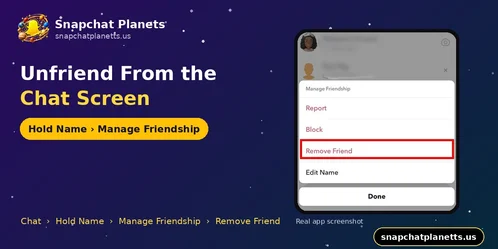
- Open Snapchat and swipe right to go to the Chat screen.
- Press and hold on the friend’s name.
- Tap Manage Friendship.
- Tap Remove Friend.
That is all. The person is off your friends list right away, and no message or alert is sent to them.
Method 2: Unfriend Someone From Their Profile
You can also remove a friend from their profile page, which helps when you want to be sure about the person before you remove them.
- Swipe right to go to the Chat screen.
- Tap the friend’s profile icon to open their profile.
- Tap the three-dot icon at the top of the screen.
- Tap Manage Friendship.
- Tap Remove Friend.
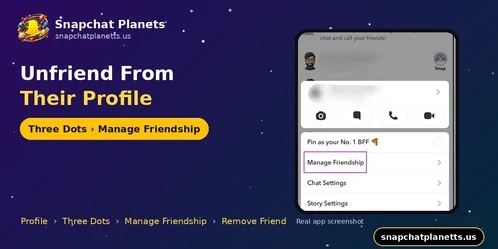
This is Snapchat’s second official method, and it lands on the same menu as Method 1. Pick this one if you want to see their profile, your friendship details, or your shared Snap Score one last time before you decide.
Method 3: Unfriend Someone From My Friends List
The My Friends list method is the best choice when you are cleaning up your whole list, because every friend sits in one place.
- Open Snapchat and tap your profile icon or Bitmoji in the top-left corner.
- Scroll down and tap My Friends.
- Find the person by scrolling, or use the search bar at the top.
- Press and hold on their name.
- Tap Manage Friendship.
- Tap Remove Friend.
- Tap Remove to confirm.
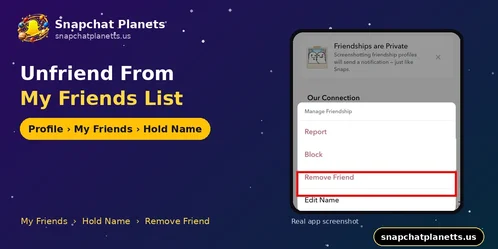
One small tip for a faster clean-up: the three-dot menu on the My Friends screen shows friends you added recently. That list is handy when you added someone by mistake and want to remove them before any chats or streaks start.
Can You Unfriend Someone on Snapchat Web or a Computer?
No. Removing a friend is an app feature, and Snapchat’s help page only lists steps for the mobile app.
Snapchat Web is made for chatting and calling from a browser. It does not have the Manage Friendship menu, so there is no Remove Friend button to tap on a computer. Every search about unadd on snapchat web or removing a friend on a computer ends at the same answer: open the app on your phone and use any of the three methods above.
Will They Know If I Unfriend Them on Snapchat?
No. Snapchat does not send a notification, a message, or any alert when you remove a friend.
This is the part most people worry about, so it is worth saying in plain words. If you unfriend someone on snapchat, will they know right away? No. Nothing pops up on their phone, there is no “you were removed” warning, and your name is not marked in any way on their side.
That does not mean they can never work it out. With time, a removed friend may notice that your private Stories no longer show up for them, or that they cannot see things only friends can see. Section 6 of this guide lists the exact signs and those same signs work for you too, when you want to check if someone removed you.
What Happens When You Unfriend Someone on Snapchat
When you remove a friend, they lose access to your private Stories and your Charms, but they can still see anything you post in public.
Snapchat’s help page is clear on this split. Your private Stories are for friends only, so a removed person stops seeing them at once. Your public Stories and Spotlight posts are open to everyone, so those stay visible to them, the same as to any other user who finds your profile.
One more effect is easy to miss. Removing a friend also takes them off your Stories screen, just like blocking or muting does. And what they can still do after removal depends on your privacy settings that part is covered next, because it is where most guides get the facts wrong.
What Happens to Chats, Snap Score and Streaks?
Your old chat with the person does not vanish the moment you remove them, and messages that were saved in the chat stay saved.
What changes is what comes next. A removed friend is no longer on your list, so the friendship extras stop. The Snap Score you share with that person stops growing, because scores only grow when friends send snaps to each other. A Snapstreak also cannot keep going once you are no longer friends sending snaps every day, so the streak ends.
Be careful with one claim you may see on other sites: that a removed friend can never message you again. That is not fully true. Snapchat’s help page says a removed person may still be able to Chat or Snap you, based on your privacy settings. If your settings let everyone contact you, they can still reach you. If you want that door fully closed, use the settings given in Section 9 of this guide or block them, as the next section explains.
Unfriend vs Block: Which One Should You Use?
Unfriend if you just want the person off your list. Block if you want them to have no way to find you, contact you, or add you again.
Both actions are silent, and neither one sends a notification. The real difference is how much contact is left after. This table shows it in one look:
| What happens | Unfriend (Remove Friend) | Block |
|---|---|---|
| Off your friends list | Yes | Yes |
| Can see your private Stories | No | No |
| Can see your public posts | Yes | No |
| Can send you a new friend request | Yes | No |
| Can find your profile in search | Yes | No |
| You can undo it later | Yes, add them back | Yes, unblock them |
So the simple rule is this: unfriend for people you are done with but do not mind seeing around the app. Block for people you want fully out an ex who keeps adding you, a stranger who will not stop, or anyone who makes you feel unsafe. Our full guide on how to block someone on snapchat walks through the block steps in detail.
Unfriend vs Unfollow vs Leaving a Group Chat
These three get mixed up a lot, but they are three different actions for three different things.
Unfollow is for public creators and subscriptions, not for friends. If you follow a public profile’s Stories, unfollowing stops those Stories it does not touch your friends list at all. Leaving a group chat is also separate: you leave from the group chat’s own settings, and leaving a group does not unfriend anyone in it.
And removing followers is not an unfriend action either. Followers belong to a public profile, and that is handled in your public profile settings, not in Manage Friendship. If the person is on your friends list, the only action you need is Remove Friend.
How to Tell If Someone Unfriended You on Snapchat (Signs)
Two searches bring most people to this section: how to know if someone unfriended you on snapchat, and how to tell if someone unfriended you on snapchat. There is no single button that gives the answer, but three checks together make it almost certain.
Snapchat never sends a “you were removed” alert, so you have to read the signs yourself. Do all three checks below before you decide. One sign alone can mislead you, but all three pointing the same way rarely lie.
Check 1: Search your friends list. Open your profile, tap My Friends, and type their name in the search bar. If they are gone from your list, one of you removed the other and if you did not do it, they did.
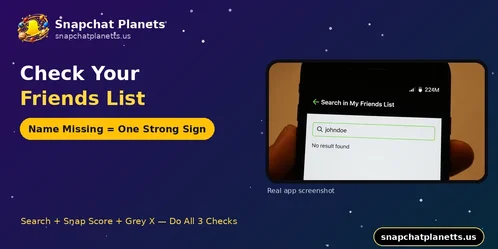
Check 2: Look at their profile. Tap their name in a chat and open their profile. If you can no longer see their Snap Score, that is a strong sign the friendship is over, because friends can see each other’s scores. Check 3: Look at your chat with them. A grey X next to their name, or a grey “pending” arrow on your snaps, means you are not on their friends list right now. Our guide on what does the x mean on snapchat explains that sign in full.
One warning, because many guides get this wrong: if the person’s profile does not show up at all when you search their username, that does not prove they unfriended you. A missing profile points more to a block, or to an account that was closed. A removed friend can still find you and see your public profile — that is the whole difference between removing and blocking, explained in Section 5 above.
How to Remove Someone From Your Best Friends List
There is no button that edits your Best Friends list by hand. The only fast way to take someone off it is to unfriend them.
Your Best Friends list is built by the app itself, based on who you chat and snap with the most. Snapchat does not let you add, remove, or reorder people on it yourself. So if you are asking how to remove someone from your best friends list on snapchat without removing them as a friend, the honest answer is: you cannot do it directly. What you can do is talk to them less. Send fewer snaps and chats to that person, and talk more to others, and the list will slowly change on its own.
If the person has to come off today, use any method from Section 2 of this guide and remove them as a friend. The moment the friendship ends, they are off your Best Friends list too, because that list only holds current friends.
Can You Unfriend Multiple People at Once?
No. Snapchat has no bulk remove option, and its help page says friends can only be removed one at a time.
This is why searches like mass unadd on snapchat and remove multiple friends at once on snapchat are so common people want one tap that clears the whole list, and that tap does not exist. The same hope sits behind how to unfriend people on snapchat in one go when a big clean-up is due. Be careful with any app or site that promises to delete multiple friends on snapchat at once for you. Snapchat does not offer this feature, and giving your login to a third-party tool puts your account at risk. The only way every friend leaves at once is if the whole account is deleted an extreme step, not a clean-up method. If you ever truly need that, our guide on how to delete snapchat account covers it properly.
The fastest safe way is the My Friends list method from Section 2 of this guide. Work down the list from top to bottom, hold each name, and remove one by one. It is slow, but a list of 20 people still takes only a few minutes, and your account stays safe.
How to Add Back Someone You Unfriended
You can add a removed friend back at any time, but there is no deleted friends list in the app to pick them from.
Snapchat does not keep a bin of people you removed. To add someone back, you have to find them again in one of the normal ways: search their username in the search bar, add them from your phone contacts, or scan their Snapcode. Then send a fresh friend request and note this part, because it is new for many people: they have to accept your request before you are friends again, just like the first time.
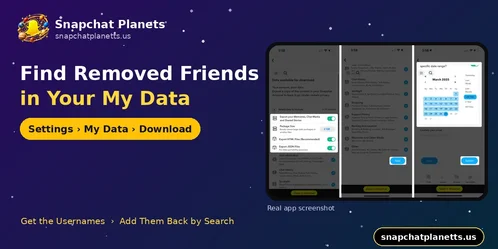
If you removed a lot of people and cannot remember who they were, there is one back door. In the app’s settings you can download your My Data, and that file includes your friends list history. It is not a one-tap restore, but it gives you the usernames, and you can add back the ones you want by search.
How to Stop an Unfriended Person From Adding You Back
Removing a friend does not stop them from sending you a new request. To close that door, change who is allowed to contact you.
Open your profile, tap the gear icon for settings, and look at the privacy controls. Set “Contact Me” to My Friends so only friends can send you chats and snaps, and check “View My Story” so your Stories stay with the people you choose. A removed person can still send a request after this, but they cannot reach your chats or Stories while they are not your friend.
If one person keeps coming back and the requests themselves are the problem, privacy settings are not enough. Block them. Blocking is the only action that stops a person from finding you and adding you again, and Section 5 of this guide shows how it compares with unfriending.
FAQs
Can someone I unfriended still see my location on Snap Map?
Only if your location settings let them. The Snap Map follows its own settings, not your friends list alone. If your location is shared with “My Friends,” a removed person is no longer a friend, so they stop seeing your location. If you ever set sharing to a wider group, check that setting too and Ghost Mode hides you from everyone.
Can I still follow someone’s public Stories after I unfriend them?
Yes, you can. Unfriending ends the friendship, but it does not block their public side. If the person has a public profile, you can still open it, watch their public Stories, and follow that profile like any other user. They just no longer get your private Stories, and you no longer get theirs.
Can I unfriend someone who is not on my friends list?
No, because there is no friendship to end. Remove Friend only exists for people who are your friends. If the person only sent you a request, just ignore or delete the request and nothing more is needed. If a person who is not your friend keeps bothering you, the right tool is Block, not Remove Friend.
Why is the Remove Friend option not showing for me?
This usually means one of three things. The person is already off your list, so there is nothing left to remove. Or you opened the wrong menu Remove Friend sits inside Manage Friendship, which you reach by holding the name or tapping the three-dot icon on their profile. Or the app is glitching, and a restart or an update fixes it.
Does unfriending someone remove me from their Best Friends list too?
Most likely yes, with time. You cannot see or edit their list Best Friends lists are private, and each one is built from that person’s own chatting and snapping. Once you remove them, you two stop swapping snaps and chats as friends, so you drop off their list the same way they drop off yours. It may not happen the same second, but it does happen.
Conclusion
You now know how to unfriend someone on snapchat in three ways from the Chat screen, from their profile, and from My Friends, and you know it stays silent every time. No alert goes out, their private access ends, and your chats, score, and streaks with them stop where they are.
Keep the simple rule from this guide: unfriend when you just want someone off your list, and block when you want them gone for good. Both take less than a minute, and both can be undone if you change your mind later.