
So you have decided to leave Snapchat. Maybe you are tired of the app, maybe you made a new account, or maybe you just want your data gone. The good news is that the process is short. The part most people do not know is that the account does not die the moment you press the button. Snapchat first switches it off for 30 days, and the full deletion takes 60 days in total.
This guide shows you how to delete snapchat account the right way, step by step. You will learn how to delete account in snapchat from the app and from the website, how to save your photos and data first, and how to get the account back if you change your mind in time.
This is the complete guide on how to delete snapchat account, from the first tap to the final day. No shortcuts, no fake tools, only the real method Snapchat itself gives. And if you are not leaving at all and only landed here while exploring the app, our home page guide on snapchat planets is where most of our readers start.
How to Delete Snapchat Account
- Open Snapchat. Tap your profile icon, then tap the gear icon to open Settings.
- Scroll down to Account Actions and tap Delete Account.
- The app opens the official accounts portal in your browser. Type your username and password, then tap Continue.
- If Snapchat sends a code to your phone, type the code and confirm.
- Your account is now off. After 30 days it cannot be restored, and at day 60 it is deleted for good. In India, the full process takes 210 days.
Read those five steps once more, because they are the whole job. Everything else in this guide is detail: what to save first, what your friends will see, and what to do if a step fails. One fact saves many people from a big mistake ,deleting the app from your phone does not delete your account. Only the steps above start the deactivation period, and only a login inside the first 30 days can stop it and reactivate your account.
Before You Delete: 3 Things to Do First
First, save your data. The day your account is deleted for good, everything goes with it your saved photos, your chats, your account history. There is no way to get any of it back after that day. So download your data while the account is still alive. It takes one minute, and the full steps are given later in this guide. If your Memories matter to you, do not skip this.
Second, if you pay for Snapchat+, cancel it yourself. A Snapchat+ subscription is billed by the App Store or Google Play, not by the Snapchat account itself. Deleting the account does not stop those payments. Cancel the subscription in your phone’s store settings first, or you may keep paying for an account that no longer exists. None of this takes long, and doing it first makes how to delete snapchat account a clean, one-way trip with nothing left behind.
Third, be clear about one simple point. Removing the app from your phone is not the same as deleting the account. When you remove the app, your profile, your friends list and your data all stay active on Snapchat’s side. People can still find you and send you snaps. The account only starts to close when you finish the delete steps below.
How to Delete Snapchat Account
There are two ways to do this, and both end at the same official page. Use the app if you are logged in on your phone. Use the website if the app is not working or you are on a computer. The result is the same either way.
Delete From the App (iPhone and Android)
The steps are the same on iPhone and Android. Snapchat’s support page gives one path for both phones, so do not worry if your friend’s screen looks a little different from yours. Open Snapchat and tap your profile icon at the top left. Then tap the gear icon to open Settings.
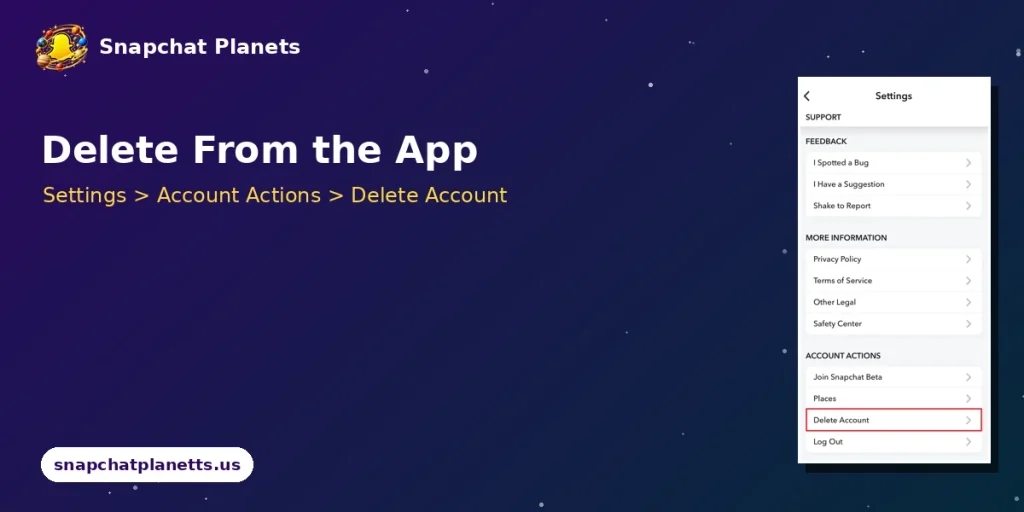
Scroll down until you see the Account Actions section, and tap Delete Account. The app now takes you out of Snapchat and opens the accounts portal in your browser. This surprises many users, but it is normal. Snapchat always confirms a deletion on this portal page, even when you start inside the app.
On the portal page, type your username and password and tap Continue. Snapchat may send a verification code to the phone number linked to your account. Type the code, confirm, and you are done. From that second, your account is switched off. You can now remove the app from your phone if you want.
Delete From the Website (Accounts Portal)
Many people search for delete snapchat website because they want to do this job on a computer, without the app at all. That works fine. Open your browser and go to the official delete page: accounts.snapchat.com/accounts/delete_account. Log in if the page asks you to.
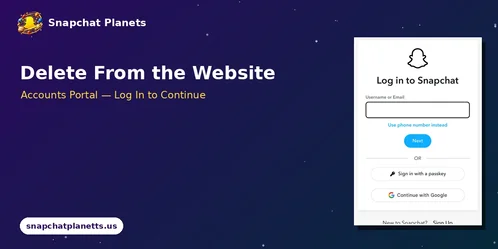
Click Delete My Account. The page will ask for your username and password one more time this is Snapchat’s way of making sure it is really you. Type them and click Continue. For some accounts, Snapchat sends a security code to the linked phone. Type the code, submit it, and enter your details again if the page asks. When you see the confirmation message, the switch-off has started.
One warning belongs here, and it matters. Only use this official portal page. Never type your Snapchat password into any other website or app that promises to delete your account for you. Such pages are a common trick to steal accounts. Snapchat never asks for your password on any page except its own.
Deactivate vs Delete: What Is the Difference?
Many users look for a deactivate button inside Snapchat. There is none. On Snapchat, deactivation is not a separate feature it is simply the first stage of deletion. When you deactivate snapchat through the delete steps, your account hides for 30 days. If you log in during those 30 days, the account wakes up again as if nothing happened. If you stay away, deletion moves ahead on its own.
So how to deactivate snapchat account and how to delete snapchat account are the same question with two possible endings. The table below makes it plain.
| Stage | What happens | Can you undo it? |
|---|---|---|
| Deactivated (days 1 to 30) | Account is hidden. Friends cannot contact you. Deletion is set to happen. | Yes – just log in again. |
| Permanently deleted (day 60) | Account and data are removed for good. | No – it is gone. |
| App removed from phone | Nothing changes. The account stays fully active. | Nothing to undo. |
This also means the delete process works well as a break. If you only need time away from Snapchat, start the process and stay logged out for as long as your break lasts. Just watch the calendar. A break that runs past day 30 turns into a real deletion, even if that was never your plan.
Erase, Close or Remove: Different Words, Same Process
People use many words for the same wish. Some search how to erase a snapchat account. Some search how to close snapchat account, or how to remove the account fully. Others type short forms like snapchat delete account or delete snapchat, hoping for a one-tap button. These are not three different jobs. Snapchat has no erase button, no close button and no remove button. Every one of those searches leads to the same single delete process you have just read.
So do not waste time hunting through Settings for a hidden option that is not there. Whether your goal is to close snapchat account for a month or to erase it forever, you follow the same app or website steps, and the same clock starts. The only real choice is yours: log back in within 30 days and keep the account, or stay away and let it go.
The 60-Day Timeline: When Is It Really Gone?
Ask most people how long does it take to delete a snapchat account, and they will say 30 days. That answer is only half true, and it is the mistake almost every guide on the internet repeats. We checked Snapchat’s own support page for this guide. The full permanent deletion takes 60 days, and here is how those days pass. The same mix-up sits behind another common search, how to permanently delete snapchat account, as if permanent deletion were a separate, quicker job. It is not it is this same process, simply seen through to the end.
| Time | What is happening to your account |
|---|---|
| Day 0 | You confirm the deletion. The account switches off at once. |
| Days 1 to 30 | The account is hidden and deactivated. You can still log in to save it, and you can still download your data. |
| Day 31 | The account can no longer be restored. The last stage of deletion begins. |
| Day 60 | Permanent deletion is complete. The account and its data are gone. |
One country is different. In India, the law gives a longer window, so the full process takes 210 days 30 days switched off, then up to 180 more days before the final removal. If you are in India, plan with 210 days in mind, not 60.
Also note when the clock starts. It starts the moment you confirm on the portal page not when you remove the app, and not when you stop opening Snapchat. An account can sit unused for a year and still be fully alive. Only a confirmed delete request starts the countdown to permanent deletion.
How to Reactivate Your Account Within 30 Days
Changed your mind? Good news inside the first 30 days, saving the account is the easiest job in this whole guide. Open Snapchat or the portal page and log in with your username and password. Use your username, not the display name your friends see. That one login cancels the deletion at once.
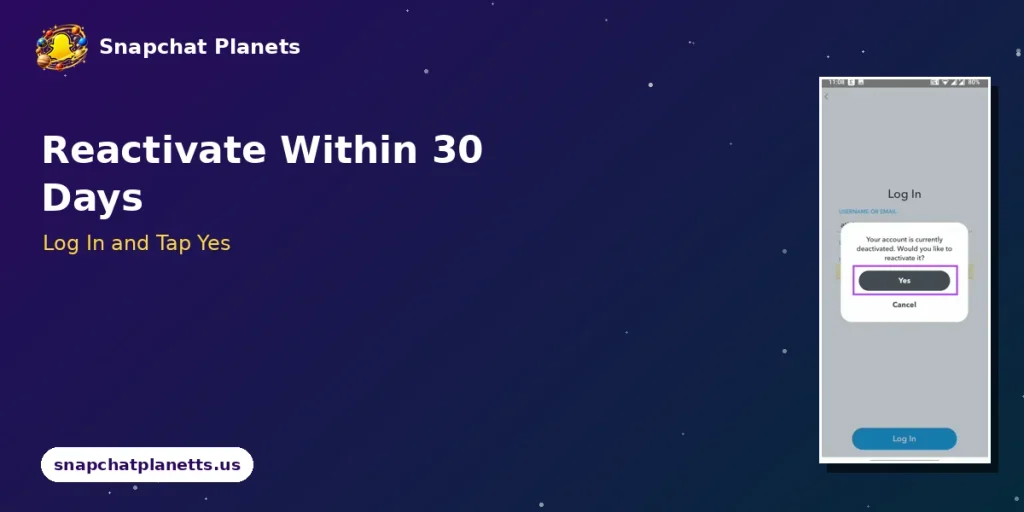
Do not panic if the account does not look normal right away. Snapchat says the restore can take a few hours. Your friends, snaps and settings come back step by step. Some users also see a “user not found” message when they try to log in soon after switching the account off. If that happens to you, wait a few hours and try again. Do not make a new account in a hurry your old one is most likely still coming back.
After day 30, this door closes for good. No login, no password reset and no request to Snapchat Support can bring the account back, because the account has already moved into the final stage of deletion. This safety window is the kindest part of how to delete snapchat account: Snapchat gives you a full month to undo it. So if there is any chance you may want the account again, set a reminder for day 25 and decide before the window shuts.
Download Your Data Before It Is Deleted
Snapchat lets you take a copy of your account data with you. You can do this only while the account is alive, which in real terms means inside the 30-day window after you start the deletion. Go to accounts.snapchat.com, log in, and open the My Data page.
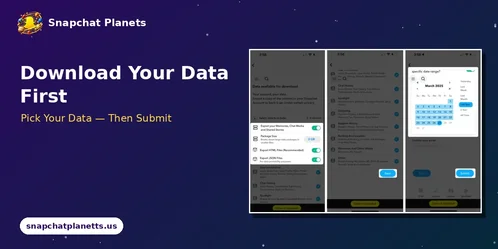
On that page, pick what you want to keep. You can include an export of your Memories, your chat history, your profile details, your login history and your snap history. Then tap Submit Request. Snapchat prepares a file and sends a download link to your email. Save the file to your phone or computer as soon as the email comes, because the link does not stay live forever.
If your saved photos are the main reason you are still on Snapchat, read this part twice. Once the account is deleted for good, those Memories are gone with it the same risk we explain in our guide on is snapchat deleting memories. Two minutes of downloading now can save years of photos.
What Gets Deleted vs What Snapchat Keeps
When the day-60 mark passes, the account itself is removed. Your profile and username go. Your snaps, chats and stories go. Your Memories, your place on the Snap Map and your public profile all go with them. Anyone who searches your username after that day will find nothing, as if the account was never there. This is what most people mean when they say they want to delete snapchat profile and all and this process does exactly that.
But “deleted” does not mean every single record vanishes, and Snapchat is open about this on its own page. Snapchat keeps some information, such as the details you gave when you bought something, and the record that you agreed to its Terms of Service and Privacy Policy. It keeps these where the law, safety or business needs require it. This kind of data retention is normal for big apps, and it is better that you hear it plainly here than guess about it later.
One more point in the other direction. In short, how to delete snapchat account has two halves what vanishes, and the small part Snapchat keeps. If you only deactivated and then logged back in, nothing was deleted at all. Deactivation alone removes nothing. Your account comes back whole, with your friends, score and history in place.
What Your Friends See When You Delete
From the moment the account switches off, you vanish for other people. Friends cannot send you snaps or chats. Your name leaves their friends list and their search results. Your Snap Score and your profile can no longer be seen by anyone.
If a friend opens an old chat with you during the 30 days, the chat cannot reach an active account. After the final deletion at day 60, your username returns nothing at all. To your friends, it looks the same as if you had never joined Snapchat.
Sometimes a full deletion is more than the problem needs. If one person is bothering you, blocking that one person takes a few seconds and keeps your account, photos and friends safe. Our guide on how to block someone on snapchat shows those steps in full.
Troubleshooting: When the Delete Steps Fail
Most failed deletions come down to a few small problems. A code does not arrive. A password is forgotten. A menu option is missing. Work through the fixes below none of them needs any tool outside Snapchat’s own pages.
The Verification Code Never Arrives
Check that the phone number linked to your account is still your number. Then wait a few minutes and ask for the code one more time. Asking again and again in a rush can slow the code down, so give it a little time between tries. Also check your phone signal, and check that the message is not sitting in a spam folder in your messages app. Many “missing code” cases end right there.
Forgot Your Password or Lost Access
People often ask how to delete snapchat account without password, because they lost the password long ago. The honest answer is that you must get back into the account first Snapchat will not delete an account you cannot prove is yours. On the login screen, tap Forgot Password and reset it through your linked email or by a text message to your phone.
If you no longer have that email or that phone number, contact Snapchat Support from the official help pages and be ready to prove the account is yours. Without a linked contact method, account recovery is slow and success is not promised. That is why sorting the password out first is always the fastest road to deletion.
Locked Out by Two-Factor Authentication
If you turned on two-factor authentication, use one of the backup codes Snapchat gave you at that time. Those codes exist for exactly this day. Keep them safe and use one to log in, then delete as normal.
Be careful with advice you may find on random websites that tells you to switch this protection off through some tool or trick. If you are locked out, the only safe paths are Snapchat’s own login page and its official Support. Any other “helper” is most likely after your account.
No Delete Account Option in Your Settings
Update the Snapchat app first. Old versions of the app can hide the Account Actions section, and the delete option hides with it. After the update, open Settings again and scroll down – for most users the option is simply there now.
If it still does not show, leave the app alone and use the website route given above in this guide. The portal page does the same job, and on the web there is no menu to hunt through. The delete page opens right after you log in.
Your Account Is Locked or Flagged
A locked account can refuse the delete steps until the lock is sorted out. Use Snapchat’s official unlock page and Support pages to clear the lock first. Once you can log in normally again, the delete steps will work as written in this guide.
And one last warning for this whole section. Never pay for a “Snapchat delete service” and never log in on a page that offers to delete the account for you. There is no official service like that. Those pages exist to steal login details, and they have taken many accounts from people who were only trying to leave.
Can You Delete Your Account Instantly and Permanently?
No. There is no instant delete on Snapchat, and any page that promises one is not telling the truth. The 30-day wait is built into every deletion on purpose, so that an account cannot be wiped out by mistake, or by someone who picks up your phone for a minute. Day 60 is the earliest any account is fully gone – day 210 in India.
There is also no paid fast lane. Snapchat+ does not shorten the wait. No setting inside the app skips it. A free account made last week and a paid account made ten years ago both follow the same 30 days off, then the same finish at day 60.
What is instant is the part most people actually care about. The second you confirm, your profile hides, friends cannot reach you, and you are logged out. For most people leaving Snapchat, that instant vanishing is the real goal. The rest is just the clock doing its work.
Frequently Asked Questions
Can I delete my child’s Snapchat account as a parent?
Not from your own account. Deletion can only be confirmed from inside the account itself, with its own username and password. If you have your child’s login, the steps in this guide work as normal. If you do not, contact Snapchat Support through the official help pages and ask what a parent can do Snapchat acts only on requests it can check and confirm.
How do I request deletion of a deceased person’s Snapchat account?
Contact Snapchat Support through the official help pages and explain the case in clear words. You will most likely need to show your link to the person and proof of death. Snapchat deals with these requests one by one, and the normal in-app delete steps are not used, because no one should be using the person’s password.
Can I create a new account with the same email after permanent deletion?
Yes. Once the deletion is fully complete day 60, or day 210 in India the email address becomes free again, and you can use it for a brand-new account. During the first 30 days you cannot, because the old account still exists. In that window, logging in with that email simply brings the old account back.
Can Snapchat Support delete my account for me if I just ask them?
No, not as a shortcut. Support will send you to the same portal steps given in this guide, because a deletion must be confirmed from inside the account itself. The real job of Support is different: they help when you are locked out, when you have lost your email and phone, or when you are reporting someone else’s account.
I have two Snapchat accounts. Does deleting one delete the other?
No. Each Snapchat account stands on its own, and deletion applies only to the account you are logged in to when you confirm. So read the username on the confirmation screen with care before you tap Continue. If you want both accounts gone, you must repeat the full process for the second account on its own.
Conclusion
Let us put the whole job in one short line: how to delete snapchat account for good comes down to four moves open Settings, go to Account Actions, confirm on the official portal, and then stay logged out. Your account hides at once, waits 30 days in case you return, and is deleted for good at day 60. Save your data first, cancel any store-billed Snapchat+ plan yourself, and trust no outside tool with your password. Follow it once, and the job to permanently delete snapchat account is done properly, with no loose ends left behind.
And if you are not leaving only cleaning up a lighter touch may be enough. Clearing old app data now and then keeps Snapchat light without losing your account see how to clear cache on snapchat for the full steps.
One Response