
Many people are asking, is snapchat deleting memories? Many people search for snapchat deleting memories because they saw a post that said their photos would be gone soon. The short answer is no. Snapchat will not delete your Memories just because you do not pay. At Snapchat Planets, we checked the official pages from Snapchat Support and Snap Newsroom, so you get the true facts here, in simple word
No, Snapchat is not deleting your Memories. If your Memories use more than 5GB of free storage, the old ones will be archived from January 2027. They will not be gone. You will still see them as small pictures, but you will not be able to open, edit, or share them until you download them or buy more storage.
Here is the quick check for the main questions. Is snapchat deleting memories? No, it is archiving old ones. When is snapchat deleting memories? There is no delete date, because archiving starts in January 2027. Is snapchat going to delete memories? No, Snapchat says it will not delete them for not upgrading. Is snapchat deleting your memories? Only if you have more than 5GB and your Memories are more than one year old. Is snapchat going to delete my memories? No, if your Memories are under 5GB, they stay safe. Will snapchat delete my memories if I do nothing? No. Is snap deleting memories? No, the rule is the same — archiving, not deleting.
What Is Happening With Snapchat Memories Storage?
Snapchat gives every account up to 5GB of free storage for Memories. This is called snapchat memories storage. Your Snaps and photos that you save in Memories count toward this 5GB. Most people use less than 5GB, so nothing changes for them.
From January 2027, Snapchat will start to archive Memories that are more than one year old and are not part of your oldest 5GB. Archived means the Memory is still saved on Snapchat’s side, but you see only a small thumbnail. The thumbnail is locked. You cannot open it, edit it, or share it until you download it or buy a storage plan.
Your newest Memories stay open. Your oldest 5GB also stays open. Only the old Memories above 5GB get archived. This is not the same as delete. Delete means gone for good. Archive means saved, but locked for now.
Who Is Affected? Check in 30 Seconds
You can check your own case in less than a minute. Open Snapchat, go to My Account, tap the gear icon for Settings, then My App, then Memories, then Cloud Storage. You will see how much space your Memories use. If you are over 5GB, you will also see a note in Memories.
Here are three simple cases. They are examples to help you understand, not real users. If you use 3.2GB, you are safe. You are under 5GB, so nothing will be archived. If you use 8GB, only part of your old Memories will be archived. Your newest Memories and your oldest 5GB stay open. If you use 22GB, many of your old Memories will be archived. You should download them first.
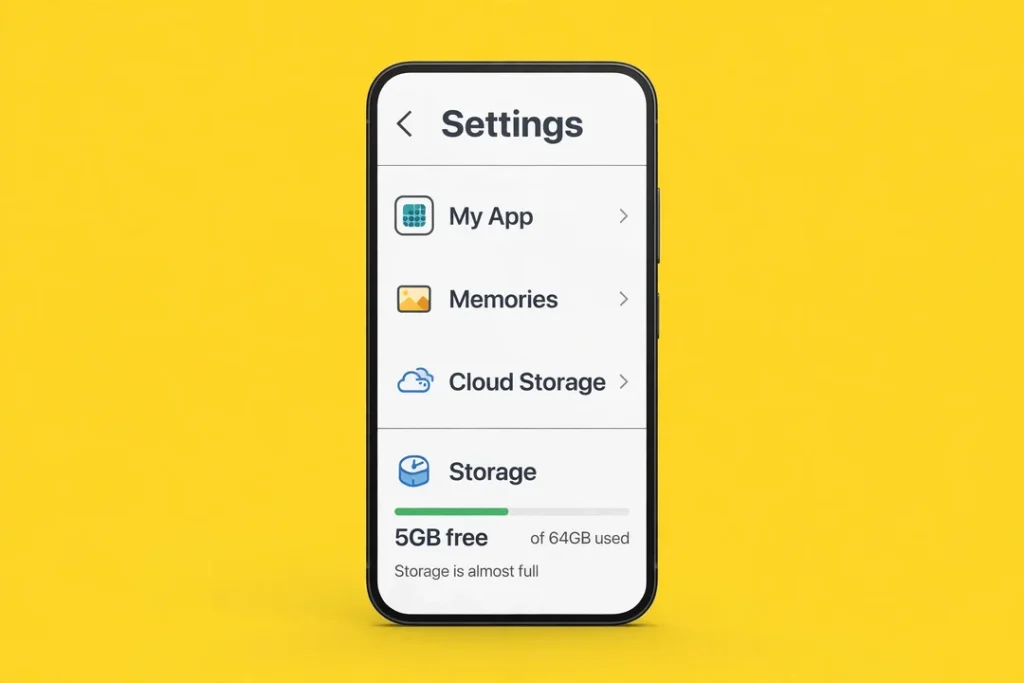
So, is snapchat deleting your memories? It depends on your size. Under 5GB means safe. Over 5GB means some old Memories will be archived in January 2027. Is snapchat gonna delete my memories? No, if you are under 5GB, they stay safe.
There Is No Universal Deletion Deadline
Many posts on the internet say Snapchat will delete all Memories on October 1, or in September 2026. That is not true. There is no single day when Snapchat deletes all Memories.
Is Snapchat really deleting memories? No. Is Snapchat actually deleting memories? No. Is it true that Snapchat is deleting memories? No, the true rule is archiving, not deleting. What day is Snapchat deleting memories? There is no such day. When is Snapchat going to start deleting memories? It is not going to start deleting. It will start archiving in January 2027. Some people also ask, is snapchat getting rid of memories? No, Snapchat is not getting rid of them. Is snapchat really going to delete memories? No, it is not going to delete them at all.
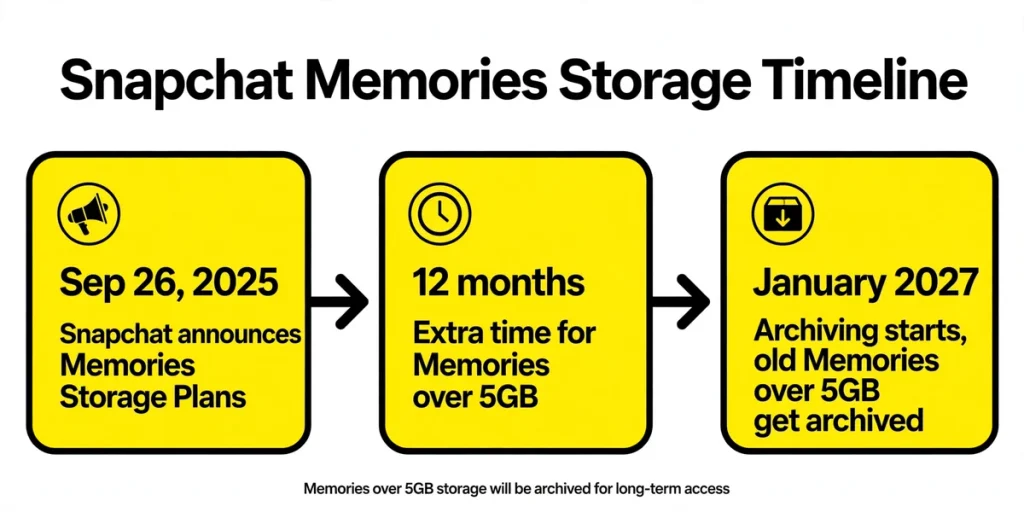
The mix-up started in September 2025. Snapchat said it would give 12 months of extra time. Some people added 12 months to September 2025 and got September 2026. That was wrong. Snapchat later made it clear: no Memories will be archived before January 2027, and it will give you a warning in the app first.
Timeline: September 2025 to January 2027
On September 26, 2025, Snapchat shared its new Memories Storage Plans. It said every account keeps up to 5GB free. It also said it would give 12 months of extra time for Memories over 5GB. Then, from January 2027, old Memories over 5GB will be archived. Snapchat also said it will send an in-app notice before it archives anything. So you will get time to save your photos first. When is snap deleting memories? It is not deleting. When will snapchat start deleting memories? It will not start deleting — archiving starts in January 2027.
Save Your Memories in 5 Minutes (Quick-Start)
You do not need a full day to save your Memories. Do these three steps now. First, check your storage with the steps above. Second, download your old Memories with My Data. Third, save your newest Memories to your phone first, then the oldest ones. That is it. The full steps are below.
How to Download All Your Memories for Free (My Data)
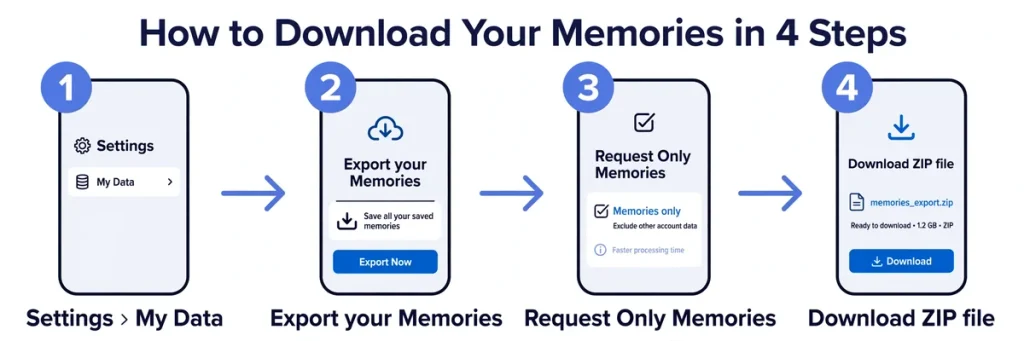
You can download all your Memories for free with My Data. You do not need to pay for this. Go to Settings, then My Data, or go to accounts.snapchat.com on a computer. Turn on Export your Memories. Click Request Only Memories. Pick a date range, or leave it off for all Memories. Confirm your email, then click Submit.
Snapchat will make a ZIP file for you. It tries to send it within 7 days. Big files can take more time. When it is ready, go to See exports, then Download. Open the file called index.html, then open Memories. Your photos and videos will be there.
One thing to know: the files in the ZIP can come out in a mixed order. Some filters, text, and stickers can be split from the photo. This is normal for My Data. So check the file after you download it, and keep a copy on your phone and on your computer.
How to Save Memories to Camera Roll (100 at a Time)
My Data is best for all your Memories at once. Camera Roll is best when you want a few photos fast. Open Memories, pick a Snap, tap the share button, then Save to Camera Roll. You can pick up to 100 Snaps at a time. So 1,000 Memories take 10 batches, and 5,000 Memories take 50 batches.
Save the oldest Memories first if you are over 5GB. Those are the ones that will be archived first. Then save the newest ones. Is snapchat deleting all memories if you do this? No. Once a photo is on your phone, Snapchat cannot archive it. It is yours.
How Much Does Extra Memories Storage Cost?
If you are over 5GB and you want to keep all your Memories open in the app, you can buy more space. Here is the simple cost list from Snapchat Support. A 100GB Memories-only plan costs $1.99 per month or $20 per year. Snapchat+ often comes with 250GB of storage. Lens+ has the same storage as Snapchat+. Snapchat+ Platinum has 5TB of storage. A Snapchat+ Family Plan gives each member their own included storage.
Some sites also report other prices. They say Snapchat+ costs $3.99 per month and Snapchat+ Platinum costs $15.99 per month. These are reported prices, not prices from the Snapchat help page. Check the price in your own app before you pay, because prices can change by country.

One warning: do not trust third-party apps that ask for your Snapchat password. One tool called SnapEasy costs $9.99, but it only sorts ZIP files. It does not save your Memories for you. Never share your Snapchat password with a downloader app.
Is There a Way to Recover Deleted Snapchat Memories?
Is there a way to recover deleted snapchat memories? The short answer is no, if you deleted the Memory yourself and it was not backed up. Snapchat Support cannot bring it back for you. Is there any way to recover deleted snapchat memories in that case? No. Once you delete a Memory that was never backed up, it is gone.
But first, check three places before you give up. Check your My Data ZIP file, if your Backup Progress was Complete. Check My Eyes Only, in case you moved the Memory there. Check your Camera Roll, in case you saved it to your phone before. Many people find their photo in one of these three places. If it is in none of them, and you deleted it yourself, it cannot be recovered.
Snapchat Memories vs Snaps vs Chats vs Stories
People mix these up, so here is a simple table in words. Unopened Snaps are deleted after 31 days. Chats are deleted 24 hours after you view them, or 31 days after they are sent. Topic Chats are kept for 5 years. My Story lasts about 24 hours. Shared Stories can hold up to 1,000 Snaps. My AI chats stay saved until you delete them. If you use Keep Snaps in Chat, that Snap stays in the chat.
Memories are different from all of these. Memories are the photos you chose to save. They do not delete after 24 hours or 31 days. They stay in your cloud storage, up to your 5GB free limit. Stories are short, so some people also look for an anonymous Snapchat story viewer to check a Story without the other person knowing. One more warning: Snapchat tells the other person when you take a screenshot of a Snap, Chat, or Story.
Why Is Snapchat Deleting My Memories?
Why is snapchat deleting memories? The short answer is that it is not deleting them. It is setting a limit on free storage. After 10 years of free, unlimited Memories, Snapchat now gives 5GB free and asks you to pay for more. That is why many users are upset. They saved years of photos for free, and now they must download them or pay.
Why is snapchat deleting my memories, in your case? Most likely, you are over 5GB. Check your storage, download your old Memories, and you will keep them. You do not have to pay if you download them in time. Snapchat also uses small hearts next to friends’ names, and many people ask What Does the Red Heart Mean on Snapchat?
My Memories Are Missing — What to Do
If you cannot find a Memory, work through this list in order. First, check your Backup Progress. If it says Complete, your Memory was backed up. If it says it is still backing up, wait and check again. Second, check My Eyes Only. Third, check your date filter in Memories. Fourth, check if the Memory is archived, that means you are over 5GB and it is more than one year old. Fifth, check that you are logged in to the right account. Sixth, check your Camera Roll. Last, contact Snapchat Support if none of these steps help.
Frequently Asked Question
Do My Eyes Only Memories count toward the 5GB free limit?
Yes, treat them as part of your total. My Eyes Only sits inside Memories, so check your Cloud Storage page to see your full size. If you are close to 5GB, your My Eyes Only photos count toward that same limit, so download them too if you want to keep them safe.
What happens to my Memories if I uninstall Snapchat — are they deleted?
No, uninstalling the app does not delete your backed up Memories. They stay in your cloud storage. When you install the app again and log in with the same account, you will see them again. Only Memories that were never backed up can be lost, so check your Backup Progress first.
Can I download my Memories on a computer, or only from the phone app?
You can do it on a computer. Go to accounts.snapchat.com, log in, then go to My Data and follow the same steps as on the phone. The ZIP file downloads to your computer, and you open index.html to see your Memories. This is often faster than doing it on a small phone screen.
How do I unarchive a Memory after January 2027?
You can open it again after you upgrade to a plan with more space, or after you download it with My Data. If you upgrade, open Memories and the lock goes away for the Memories inside your new limit. If you download it, the copy on your phone or computer stays yours, even if the app copy stays locked.
How long does the My Data download link stay valid, and can I download it again?
Snapchat does not give a fixed number of days for the link on its help page, so download the ZIP as soon as you get the email. If the link stops working, go back to My Data and request a new export. Keep a copy of the ZIP on your phone and on your computer, so you do not need to ask for it again.
Conclusion
Check your storage today. If you are under 5GB, you are safe and you do not need to do anything. If you are over 5GB, download your oldest Memories first with My Data, then save the rest to Camera Roll. Do it before January 2027, so nothing gets archived. You can also read about Snapchat Best Friends Planets to understand your friend list better. Snapchat Planets will keep this guide updated if Snapchat changes the rule.
2 Responses