
Is Snapchat Deleting Memories? No, Archiving Starts January 2027

Many people are asking, is snapchat deleting memories? Many people search for snapchat deleting memories because they saw a post that said their photos would be gone soon. The short answer is no. Snapchat will not delete your Memories just because you do not pay. At Snapchat Planets, we checked the official pages from Snapchat Support and Snap Newsroom, so you get the true facts here, in simple word No, Snapchat is not deleting your Memories. If your Memories use more than 5GB of free storage, the old ones will be archived from January 2027. They will not be gone. You will still see them as small pictures, but you will not be able to open, edit, or share them until you download them or buy more storage. Here is the quick check for the main questions. Is snapchat deleting memories? No, it is archiving old ones. When is snapchat deleting memories? There is no delete date, because archiving starts in January 2027. Is snapchat going to delete memories? No, Snapchat says it will not delete them for not upgrading. Is snapchat deleting your memories? Only if you have more than 5GB and your Memories are more than one year old. Is snapchat going to delete my memories? No, if your Memories are under 5GB, they stay safe. Will snapchat delete my memories if I do nothing? No. Is snap deleting memories? No, the rule is the same — archiving, not deleting. What Is Happening With Snapchat Memories Storage? Snapchat gives every account up to 5GB of free storage for Memories. This is called snapchat memories storage. Your Snaps and photos that you save in Memories count toward this 5GB. Most people use less than 5GB, so nothing changes for them. From January 2027, Snapchat will start to archive Memories that are more than one year old and are not part of your oldest 5GB. Archived means the Memory is still saved on Snapchat’s side, but you see only a small thumbnail. The thumbnail is locked. You cannot open it, edit it, or share it until you download it or buy a storage plan. Your newest Memories stay open. Your oldest 5GB also stays open. Only the old Memories above 5GB get archived. This is not the same as delete. Delete means gone for good. Archive means saved, but locked for now. Who Is Affected? Check in 30 Seconds You can check your own case in less than a minute. Open Snapchat, go to My Account, tap the gear icon for Settings, then My App, then Memories, then Cloud Storage. You will see how much space your Memories use. If you are over 5GB, you will also see a note in Memories. Here are three simple cases. They are examples to help you understand, not real users. If you use 3.2GB, you are safe. You are under 5GB, so nothing will be archived. If you use 8GB, only part of your old Memories will be archived. Your newest Memories and your oldest 5GB stay open. If you use 22GB, many of your old Memories will be archived. You should download them first. So, is snapchat deleting your memories? It depends on your size. Under 5GB means safe. Over 5GB means some old Memories will be archived in January 2027. Is snapchat gonna delete my memories? No, if you are under 5GB, they stay safe. There Is No Universal Deletion Deadline Many posts on the internet say Snapchat will delete all Memories on October 1, or in September 2026. That is not true. There is no single day when Snapchat deletes all Memories. Is Snapchat really deleting memories? No. Is Snapchat actually deleting memories? No. Is it true that Snapchat is deleting memories? No, the true rule is archiving, not deleting. What day is Snapchat deleting memories? There is no such day. When is Snapchat going to start deleting memories? It is not going to start deleting. It will start archiving in January 2027. Some people also ask, is snapchat getting rid of memories? No, Snapchat is not getting rid of them. Is snapchat really going to delete memories? No, it is not going to delete them at all. The mix-up started in September 2025. Snapchat said it would give 12 months of extra time. Some people added 12 months to September 2025 and got September 2026. That was wrong. Snapchat later made it clear: no Memories will be archived before January 2027, and it will give you a warning in the app first. Timeline: September 2025 to January 2027 On September 26, 2025, Snapchat shared its new Memories Storage Plans. It said every account keeps up to 5GB free. It also said it would give 12 months of extra time for Memories over 5GB. Then, from January 2027, old Memories over 5GB will be archived. Snapchat also said it will send an in-app notice before it archives anything. So you will get time to save your photos first. When is snap deleting memories? It is not deleting. When will snapchat start deleting memories? It will not start deleting — archiving starts in January 2027. Save Your Memories in 5 Minutes (Quick-Start) You do not need a full day to save your Memories. Do these three steps now. First, check your storage with the steps above. Second, download your old Memories with My Data. Third, save your newest Memories to your phone first, then the oldest ones. That is it. The full steps are below. How to Download All Your Memories for Free (My Data) You can download all your Memories for free with My Data. You do not need to pay for this. Go to Settings, then My Data, or go to accounts.snapchat.com on a computer. Turn on Export your Memories. Click Request Only Memories. Pick a date range, or leave it off for all Memories. Confirm your email, then click Submit. Snapchat will make a ZIP file for you. It tries to send it within 7 days. Big
Anonymous Snapchat Story Viewer: How to View Stories Anonymously

Snapchat Stories let people share photos and videos with friends and followers for a limited time. However, when you watch someone’s Story through your Snapchat account, your username may appear in their viewer list. This is why many people search for an anonymous Snapchat story viewer to view Snapchat stories anonymously without using their personal account. An anonymous Snapchat Story viewer is usually a browser-based service that claims to display publicly available Stories without requiring a Snapchat login. In this guide, you will learn how these tools work, how to watch public Stories anonymously, and what privacy limitations you should know. You can also explore Snapchat Planets to understand Snapchat’s Friend Solar System and its planet meanings. What Is an Anonymous Snapchat Story Viewer? An anonymous Snapchat story viewer is an online tool designed to help users view available public Snapchat Stories without connecting their personal Snapchat account. Most of these services work through a web browser and ask users to enter a Snapchat username or profile link. The main purpose is to let visitors explore publicly available content without using their regular Snapchat profile. For example, someone may want to check a public creator’s latest Story without appearing under their Snapchat username. These services are different from the official Snapchat app. They are developed by third parties, so their features, availability, privacy practices, and reliability can vary. People may search for terms such as Snapchat anonymous story viewer, anonymous snap story viewer, snap story viewer anonymous, or anonymous story viewer Snapchat when looking for this type of service. How Does an Anonymous Snapchat Viewer Work? Most browser-based viewers follow a simple process: Some services claim to retrieve public content without requiring a Snapchat login. If a service does not use your Snapchat account or session, your personal Snapchat username may not be attached to the viewing activity in the same way as a normal logged-in view. However, this does not mean that your visit is completely invisible. The website may still collect information such as your IP address, browser type, cookies, or device details. Therefore, anonymous viewing from Snapchat and anonymous browsing on the internet are two different things. Anonymous Viewing vs. Regular Snapchat Viewing The main difference is how you access the Story and whether your Snapchat account is involved. Feature Regular Snapchat Third-Party Anonymous Viewer Snapchat login Usually required Often not required Personal Snapchat username May appear in the viewer list Usually not attached if no Snapchat account is used Public Story access Yes, depending on settings Depends on website support Private Story access Only if invited Not legitimately available Website tracking Snapchat handles account activity Third-party website may collect visitor data Reliability Official Snapchat experience Depends on the service An anonymous viewer can offer a different way to explore public content, but it does not provide the same features or guarantees as Snapchat. Snapchat also offers different friendship features that help users understand their connections. For example, the red heart emoji has a special meaning in Snapchat friendships. You can learn more in our guide, What Does the Red Heart Mean on Snapchat? How to View Snapchat Stories Anonymously Without Logging In If you want to view Snapchat Story anonymously without using your personal account, a browser-based viewer may be an option for publicly available content. The exact process depends on the website you choose. Follow these steps to understand how the process usually works. Step 1: Find the Correct Snapchat Username First, find the correct username of the person whose public Story you want to view. Remember that a Snapchat username and display name are not always the same. A display name can be changed and may not uniquely identify an account. For better results, check the exact username from a public profile link or another reliable source. A small spelling mistake can lead to an incorrect profile or no results. Step 2: Check Whether the Profile Is Public Before using an anonymous viewer, understand the difference between a public profile and a private account. A public Snapchat profile may have content available to a wider audience, depending on the owner’s settings. A regular personal profile or private Story may only be visible to selected friends. Having a public profile does not automatically mean that the person has an active Story. Some users create public profiles but do not post Stories regularly. Step 3: Enter the Username or Supported Profile URL Open the anonymous viewer website and look for its username or profile search field. Enter the correct Snapchat username. If the service supports profile URLs, you may be able to paste the public profile link instead. Not every website supports both options. Avoid entering your Snapchat password or other sensitive account details into an unfamiliar third-party website. Step 4: View Available Public Stories If the website supports the profile and finds available content, it may display public Stories or other media. Select the content you want to explore. Keep in mind that results can vary because of content availability, website limitations, and changes to Snapchat’s platform. If no Story appears, it does not necessarily mean the profile is inactive. The Story may have expired, been deleted, or may not be supported by that particular viewer. Can You View Snapchat Stories Without Appearing in the Viewer List? This is one of the most common reasons people search for a Snapchat story viewer anonymous tool. When you watch a Story through your regular Snapchat account, the account owner may see your username in the viewer list. Snapchat provides Story owners with viewer information through its Story insights and related features. A third-party website that does not use your personal Snapchat account may avoid attaching your Snapchat username to that activity. However, this depends on how the website works and whether it can actually retrieve the content. How Snapchat’s Story Viewer List Works Snapchat allows eligible users to check who has viewed their Stories. For public Stories, creators can access Story insights and viewer information through
What Does the Red Heart Mean on Snapchat? ❤️ Explained

Have you noticed a red heart ❤️ next to someone’s name on Snapchat and wondered what it means? At Snapchat Planets, we help users understand Snapchat emojis, friendship levels, and features in simple words. This small emoji represents an important friendship milestone on the app. It tells you something about how you and another person interact on Snapchat. The red heart on Snapchat means you and another person have been each other’s #1 Best Friend for two weeks in a row. In simple words, you both send more Snaps to each other than to anyone else during that period. However, the red heart does not mean that two people are dating or in love. It is part of Snapchat’s Friend Emoji system, which shows different friendship levels based on activity. Many users search for phrases like on Snapchat what does the red heart mean or what does a red heart mean on Snapchat because they want to understand the meaning behind this symbol. This guide explains everything, including how to get the red heart, why it disappears, and how it differs from other Snapchat emojis. What Does the Red Heart Mean on Snapchat? The red heart ❤️ is Snapchat’s BFF emoji. It appears next to a friend’s name when you and that person have been each other’s #1 Best Friend for two consecutive weeks. For example, imagine you regularly send Snaps to your friend Sara. She also sends more Snaps to you than to anyone else. If you both maintain this mutual #1 Best Friend position for two weeks, Snapchat awards the red heart. This is the basic Snapchat red heart meaning. It shows that you have maintained a mutual top-friend connection on the platform. If you are wondering what does the red heart on Snapchat mean, the answer is that it represents a two-week mutual BFF milestone. You may also see people search for red heart meaning Snapchat, red heart on Snapchat meaning, or red heart in Snapchat meaning to understand the same emoji. Snapchat assigns Friend Emojis based on how you and your friends use the app. These emojis can change when your activity and friendship rankings change. What Does ❤️ Next to Someone’s Name Mean? When you see a red heart next to someone’s name in your Chat or Friends list, it means you currently have BFF status with that person. It is a two-way friendship status. You must be their #1 Best Friend, and they must also be yours. For example: This explains what does the red heart in Snapchat mean and what does red heart in Snapchat mean when you see it beside someone’s name. It is different from simply having someone on your Best Friends list. Does the Red Heart Mean Love or Friendship? No. The red heart does not confirm romantic feelings or a relationship. Snapchat uses it to represent a BFF friendship milestone. You can have a red heart with your best friend, cousin, classmate, sibling, or anyone else you regularly interact with on Snapchat. So, if someone asks what does a red heart mean Snapchat, the answer is simple: it represents mutual #1 Best Friend status, not love or dating. How Does the Red Heart Work on Snapchat? Snapchat uses Friend Emojis to show different levels of interaction between friends. These emojis appear beside usernames and can change over time. The red heart is part of this system. It appears after two people maintain mutual #1 Best Friend status for two weeks. What Does Mutual #1 Best Friend Mean? A mutual #1 Best Friend connection means that both people are at the top of each other’s Snapchat Best Friends list. Snapchat explains that Best Friends are people you Snap and Chat with most frequently. You can have up to eight Best Friends, and Snapchat updates this list regularly. However, being one of someone’s Best Friends is not enough to get the red heart. You must both be each other’s number one Best Friend. Here is a simple example: Your Snapchat activity Result You send the most Snaps to your friend, but they send more to someone else No mutual #1 status Your friend sends the most Snaps to you, but you send more to another person No mutual #1 status You both rank each other as your #1 Best Friend Mutual #1 status You maintain that position for two weeks Red heart ❤️ This is why the red heart on Snapchat meaning is different from simply being close friends on the app. Understanding Snapchat friend levels also helps you recognise the other emojis that Snapchat uses to show different friendship connections. How Long Does It Take to Get a Red Heart on Snapchat? You need to maintain mutual #1 Best Friend status for two weeks in a row to receive the red heart. The process usually follows this order: Remember, sending a large number of Snaps for 14 days does not guarantee the red heart. Your friend must also keep you as their #1 Best Friend during that period. Snapchat does not publish an exact number of Snaps or messages you must exchange every day. How to Get the Red Heart on Snapchat If you want to get the red heart with someone, focus on building a regular, two-way connection on Snapchat. Follow these points: 1. Become each other’s #1 Best Friend You and your friend must be each other’s top Snapchat Best Friend. Being one of their several Best Friends is not enough. 2. Keep your interaction consistent Continue communicating naturally through Snapchat. The platform considers how people use Snaps and Chats when determining Best Friends. 3. Maintain the status for two weeks Your mutual #1 Best Friend position must continue for two consecutive weeks. If either person’s ranking changes, you may not reach the red heart milestone. 4. Check your Friend Emoji Look at the emoji beside your friend’s name in your Chat or Friends list. The yellow heart represents mutual Besties status, while the red heart represents
Snapchat Best Friends Planets: List, Order & Meanings
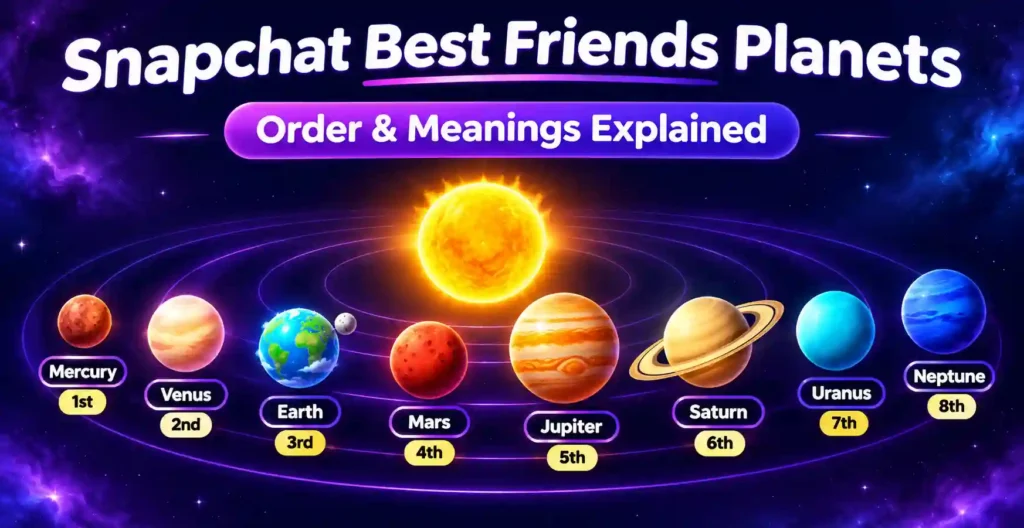
Have you ever seen a tiny planet badge under a friend’s Bitmoji on Snapchat? That planet is part of the Snapchat+ Friend Solar System. It shows how close of a friend you are to that person. Your friend is the Sun, and their top eight best friends orbit around them like planets. If you talk and send Snaps the most, you become Mercury (#1 Best Friend), the planet closest to the Sun. If you are in the eighth spot, you become Neptune (#8 Best Friend). Here is a simple guide to all eight Snapchat planets in order, what each picture means, and how to find your own planet! What Are Snapchat Best Friends Planets? Have you ever opened a friend’s Snapchat profile and noticed a planet badge with a gold ring? You may have wondered what Mercury, Venus, Earth, or Neptune means. These planets are part of Snapchat’s Friend Solar System, a special feature available to Snapchat+ subscribers. The Snapchat Best Friends Planets show your position in another person’s Best Friends list. Each planet represents a different ranking, starting with Mercury in first place and ending with Neptune in eighth place. Many users search for Snapchat Best Friend Planets because they want to understand what their planet means and whether it shows how close they are to someone. The feature gives you a visual idea of your position in that person’s Snapchat friendships, but it does not measure real-life love or loyalty. In this guide, you will learn the complete Snapchat planets order, what all eight planets mean, how to check your planet, and how the Best Friends feature works. Snapchat Best Friends List Planets: All 8 Planets in Order The Snapchat Best Friends List Planets follow the same order as the planets in our Solar System. Each planet represents one position in someone’s Best Friends ranking. Here is the complete Snapchat Best Friends order: Rank Planet Best Friends Position 1 Mercury First Best Friend 2 Venus Second Best Friend 3 Earth Third Best Friend 4 Mars Fourth Best Friend 5 Jupiter Fifth Best Friend 6 Saturn Sixth Best Friend 7 Uranus Seventh Best Friend 8 Neptune Eighth Best Friend 1. Mercury – First Best Friend Mercury represents the first position in someone’s Snapchat Best Friends list. It is the closest planet to the Sun in the real Solar System. Its Snapchat badge has a red or orange appearance. If you are Mercury in someone’s Friend Solar System, you hold the number-one position in their Best Friends ranking. This means you are currently their highest-ranked friend according to Snapchat’s Best Friends feature. 2. Venus – Second Best Friend Venus represents the second position in the Snapchat friendship ranking. Its badge has a yellowish appearance with pink details and small hearts. If you are Venus in someone’s Solar System, you are their second-ranked Best Friend. Another person holds the first position, represented by Mercury. 3. Earth – Third Best Friend Earth represents the third position in the Snapchat planet order. Its badge looks like our real planet, with blue and green colors and small decorative details. If you appear as Earth, you hold the third position in that person’s Best Friends ranking. This is a ranking inside Snapchat, not a measurement of your real friendship. 4. Mars – Fourth Best Friend Mars represents the fourth position in the Snapchat Best Friends Planets system. Its badge has a red appearance and may include small decorative details around the planet. If you are Mars in someone’s Solar System, three people are ranked ahead of you. You hold the fourth position in their Best Friends list. 5. Jupiter – Fifth Best Friend Jupiter represents the fifth position in the Solar System. Its badge has an orange or brown appearance with visible stripes. If you are Jupiter, you are the fifth person in your friend’s Snapchat Best Friends order. Four other people hold higher positions in that ranking. 6. Saturn – Sixth Best Friend Saturn represents the sixth position in the planet ranking. Its most noticeable feature is the ring around the planet, which makes the badge easy to recognize. If Saturn appears on your friend’s Solar System for you, it means you hold the sixth position in their Best Friends list. 7. Uranus – Seventh Best Friend Uranus represents the seventh position in the planet order. Its badge usually has a light blue or green appearance. If you are Uranus in someone’s Solar System, you are ranked seventh among their Best Friends. Only one position comes after yours: Neptune. 8. Neptune – Eighth Best Friend Neptune represents the eighth and final position in the Snapchat Best Friends Planets order. Its badge has a dark blue appearance. If you are Neptune, you are included in that person’s Best Friends ranking, but you hold the eighth position. It is the last planet in the eight-position system. How Does Snapchat Friend Solar System Work? The Snapchat Friend Solar System turns a person’s Best Friends ranking into a visual planet system. Instead of showing a number beside your name, Snapchat uses planets to represent the eight available positions. Snapchat explains that Best Friends are people you Snap and Chat with most. The list can include up to eight people and is updated regularly. Here is how the main parts of the feature work. What Does the Sun Represent? The Sun represents the person whose Friendship Profile you are viewing. The other person’s Solar System is built around their Best Friends ranking. For example, when you open your friend’s profile and check your planet badge, you are seeing your position in that friend’s Solar System, not your own ranking of other people. What Does Your Bitmoji Represent? Your Bitmoji is the avatar connected to your Snapchat account. In the Friend Solar System, the planet badge and its Bitmoji design help show your position in the other person’s Best Friends list. The planet is not a separate friendship score. It is a visual way to understand your ranking. How